Friday, September 07, 2007

Ruby Javier

El lenguaje de programación Ruby


Javier Smaldone (http://www.smaldone.com.ar/)


Historia


El origen de este lenguaje es bastante atípico. Fue desarrollado por el japonés Yukihiro Matsumoto (más conocido como "matz") en el año 1995 y durante sus primeros años de vida su uso no se extendió más alla de la frontera de Japón, debido a la falta de documentación en otro idioma. A finales del año 2001, gracias a la aparición de un libro de O'Reilly en inglés[0], comenzó a ser conocido internacionalmente y en el 2005 alcanzó la fama a través de "Ruby on Rails", un framework para el desarrollo de aplicaciones web escrito en Ruby.


Un detalle curioso aparece si comparamos la difusión de Ruby con la de Python. En los últimos 10 años, Python (que data de fines de los '80) ha sido el lenguaje de scripting de mayor crecimiento en todo el mundo. El auge de Ruby está apenas empezando y en los últimos 2 años ha tenido un crecimiento mucho mayor a Python. Sin embargo en Japón, donde ambos lenguajes han sido conocidos desde su comienzo, Ruby siempre ha sido más usado que Python.


Muchos programadores se acercan a Ruby a través de "Ruby on Rails" (las aplicaciones desarrolladas con este framework son, básicamente, programas Ruby que usan las librerías de RoR). Sin embargo no debemos confundirnos: el hecho de que Rails esté desarrollado y permita desarrollar en Ruby, no significa que este lenguaje sirva exclusivamente para construir aplicaciones web. En realidad, son las virtudes de este último las que han posibilitado desarrollar un framework tan potente y simple como Rails.


Características


Ruby es un lenguaje totalmente orientado a objetos que incorpora características de SmallTalk, Lisp, Eiffel, Ada y Perl. En palabras de su creador: "Quería un lenguaje de scripting que fuera más potente que Perl y más orientado a objetos que Python [1]".


En rigor, el lenguaje no incorpora ninguna característica realmente innovadora (inclusive, "revitaliza" algunas técnicas presentes en Lisp en 1958 y en SmallTalk en 1980). Su principal virtud es la forma simple en que integran mecanismos como orientación a objetos, clausuras y macros, entre otros. El resultado es un lenguaje simple (de fácil lectura), pequeño (muy pocas palabras reservadas y construcciones) y extremadamente potente (con una expresividad muy cercana a la de los lenguajes funcionales).


Ruby, como todo lenguaje de scripting, es interpretado. Existen varias implementaciones del intérprete, además de la "oficial". Una facilidad adicional, tanto para el aprendizaje como para la depuración de programas, es la disponibilidad de "irb", un intérprete interactivo (ejecutado en la línea de comandos), que permite tanto "jugar" e investigar el lenguaje, como también depurar clases de un sistema complejo.


Presentación del lenguaje


En Ruby todos son objetos. La forma de invocar un método en un objeto, es mediante expresiones "objeto.metodo". El uso de paréntesis en este tipo de invocaciones es totalmente opcional, de manera que "cuenta.depositar(20)" puede escribirse también como "cuenta.depositar 20". Otra característica llamativa es que los nombres de métodos pueden incluir, por ejemplo, el caracter "=", de manera que podemos definir un método "saldo=(valor)" y luego escribir "cuenta.saldo = valor" (nótese el espacio introducido antes de "=", permitido gracias al "azúcar sintáctica" de Ruby).


Veamos algunos ejemplos:


class Cuenta

def initialize(saldo_inicial)
@saldo = saldo_inicial
end

def saldo
@saldo
end

def depositar(monto)
@saldo += monto
end

def extraer(monto)
if monto < @saldo then
@saldo -= monto
return true
else
return false
end
end

end

a = Cuenta.new 20
puts a.saldo
a.depositar 10
puts a.saldo
if a.extraer 15 then
puts "Extracción realizada"
else
puts "Extracción superior al saldo"
end
puts a.saldo


Hemos definido una clase "Cuenta", que tiene los métodos "initialize", "saldo", "depositar" y "extraer". Luego hemos creado una instancia (objeto) "a" y lo hemos utilizado.


La salida de este programa es:


20
30
Extracción realizada
15


Examinemos este ejemplo:


  • Las clases se nombran con el primer caracter en mayúsculas ("Cuenta"). En caso de usar varias palabras,
    se utiliza la notación "camello" (por ejemplo "CuentaCorriente").

  • Los métodos y variables se nombran en minúsculas.

  • Las variables cuyo identificador comienza con "@" son "variables de instancia" o atributos (por ejemplo, "@saldo").

  • El método "initialize" de una clase, se invoca al crear una instancia de la misma. La creación de un objeto se realiza llamando al método "new" de la clase en cuestión, y los parámetros que éste reciba, serán pasados a "initialize" (por ejemplo, "Cuenta.new 20").


Ruby también permite variables y métodos de clase. Por ejemplo, podríamos modificar nuestra clase "Cuenta" de la siguiente forma:


class Cuenta

@@cuentas = 0

def self.cuentas
@@cuentas
end

def initialize(saldo_inicial)
@saldo = saldo_inicial
@@cuentas += 1
end

...

end


Hemos definido una variable de clase "@@cuentas", que será compartida por todas sus instancias (objetos). Además, hemos definido un método de clase "cuentas" (nótese la palabra "self" en la declaración, que indica que el método pertenece a la clase y no a sus instancias). Luego, podemos invocarlo directamente en la clase "Cuenta". Por ejemplo, si hiciéramos lo siguiente:


a = Cuenta.new 20
b = Cuenta.new 50

puts Cuenta.cuentas


Obtendríamos como salida "2".


Existe una serie de convenciones que simplifican la comprensión de los programas escritos en Ruby. Por ejemplo:


  • Si un método toma un valor y lo asigna a un atributo (comúnmente llamado "setter"), ese método debería llamarse igual que el atributo, con el agregado del caracter "=". Esto, sumado a la posibilidad de omitir los paréntesis, hace que la invocación de ese método parezca una asignación (como vimos en los ejemplos anteriores).

  • El nombre de un método que devuelve un valor lógico, debería terminar con el caracter "?". (Podríamos implementar un método "puede_extraer?" en la clase "Cuenta" y luego escribir "a.puede_extraer? 40".)

  • El nombre de un método que modifica el objeto sobre el que es invocado, debería finalizar con "!". (Un ejemplo de esto son los métodos "sort" y "sort!" de la clase "Array". El primero devuelve el arreglo resultante de ordenar el arreglo original, en tanto que el segundo ordena a este último.)


Ruby y las "clausuras"


Las "clausuras" son mecanismos que nos permiten pasar bloques de código como parámetros en la llamada a una función. En dichos bloques, podemos hacer referencia a identificadores definidos en el contexto (alcance o "scope") en el que se realiza la llamada. Veamos un ejemplo.


La clase "Array" provee un método "each" que recibe como parámetro un bloque y lo ejecuta para cada elemento del arreglo. El siguiente código:


saludo = "Hola "
a = ["Gabriel", "Pablo", "Javier"]
a.each{|i| puts saludo + i}


Produce la siguiente salida:


Hola Gabriel
Hola Pablo
Hola Javier


La expresión "|i|" establece la ligadura de el identificador "i" con cada uno de los elementos del arreglo "a". Luego, el bloque se ejecuta para cada uno de los elementos de este último. Nótese que, en el contexto de arreglo "a" no existe el identificador "saludo", sin embargo, el bloque es pasado como parámetro incluyendo las ligaduras al contexto en el que fue definido. Esta es la "magia" de las clausuras.


Otro ejemplo: supongamos que tenemos un arreglo "c" de objetos de clase "Cuenta" y deseamos calcular la suma de todos los saldos. Para ello, podemos hacer lo siguiente:


sumatoria = 0
c.each{|i| sumatoria += i.saldo}
puts sumatoria


Otro método de "Array" que soporta bloques como parámetros es "select", que devuelve sólo aquellos elementos para los cuales el bloque devuelve "true". Veamos otro ejemplo:


d = c.select{|i| c.saldo > 1000}


Esto selecciona (filtra) de "c" aquellas cuentas con un saldo mayor a 1000 y asigna el arreglo resultante a "d". Nótese cómo el texto del programa y su lectura (aún en castellano) son bastante similares. (Más adelante hablaremos sobre "expresividad".)


Clases "opensource"


Cualquier lenguaje de implementación "abierta" nos ofrece la posibilidad de modificar su librería estándar de funciones. En Ruby esto es trivialmente simple, ya que si ya hemos definido una clase "MiClase", una declaración del tipo "class MiClase ... end" añadirá las declaraciones introducidas a la definición ya existente.


Por ejemplo, si estamos acostumbrados a usar los métodos "head" y "tail" que devuelven, respectivamente, el primer elemento de una lista y el resto, los extrañaremos en la clase "Array" de Ruby. Pero, afortunadamente, podemos escribir la siguiente definición:


class Array
def head
self[0]
end
def tail
slice(1..-1)
end
end


Con esto, hemos añadido los métodos "head" y "tail" a la clase "Array" y, por lo tanto, pueden ser invocados en cualquier otra clase que la utilice. De esta forma es que las clases de Ruby son totalmente abiertas, ya que en cualquier lugar de nuestro sistema en donde se requiera, podemos extenderlas o modificarlas.


Expresividad


Por "expresividad" entendemos la posibilidad de expresar "claramente" mediante el código de un programa qué es lo que este realiza. Todos sabemos que algunos lenguajes, aunque quizás muy eficientes, son extremadamente "oscuros", y requieren de un buen rato estudiando cada línea y cada construcción para averiguar exáctamente qué hace un programa y cómo lo hace (al extremo en que podríamos hablar de lenguajes de "sólo escritura").


Ruby, a través de sus construcciones, nos ofrece la posibilidad de programar de forma "declarativa", esto es, que el código de nuestros programas resuelva el problema y, a la vez, sirva de especificación del mismo.


Tomemos como ejemplo el algoritmo de ordenamiento "quicksort". En su forma más simple, este algoritmo podría enunciarse como sigue:


Se toma el primer elemento de la lista a ordenar, se ubican a su izquierda los valores menores que éste, a su derecha los mayores, y luego se aplica recursivamente el mismo algoritmo en ambas partes.


De una manera aún más sintética, podríamos decir que hacer "quicksort" de una lista es aplicar "quicksort" a los menores que el primer elemento, luego agregar este y finalmente "quicksort" aplicado a los mayores.


Implementar "quicksort" en lenguajes como Java, C#, PHP o Pascal requeriría de más de 50 líneas de código y su comprensión, para alguien que no conociera el algoritmo de antemano, no sería trivial. En Ruby, utilizando los métodos definidos anteriormente en "Array", podríamos escribir lo siguiente:


class Array
def qs
empty? ? [] : tail.select{|e| e<=head}.qs + [head] + tail.select{|e| e>head}.qs
end
end


El método "empty?" devuelve "true" si y sólo si el arreglo está vacío. El operador de asignación condicional "a ? b : c" evalúa la expresión "a", si ésta es verdadera devuelve el valor "b" y en caso contrario, "c".


Habiendo aclarado esto, la lectura de nuestro "quicksort" ("qs") es muy simple: Si el arreglo es vacío, devuelve un arreglo vacío ("[]"), y en caso contrario, devuelve el resultado de aplicar "qs" a los elementos menores al primero ("head"), seguido de éste elemento, seguido del resultado de aplicar "qs" a los elementos mayores al primero.


Como podemos ver, la implementación de "quicksort" en Ruby es prácticamente su especificación. ¡Esto es expresividad!.


Programación divertida


20:11 ST: Talleres 2 -vs- Instituto 0

La expresividad de Ruby se combina con un principio llamado de "menor sorpresa". Esto significa que las cosas se llaman como uno esperaría que se llamen y funcionan de la manera en que uno esperaría que funcionen. Sumando ambos elementos, el resultado es un lenguaje en el que resulta "divertido programar".


La realidad nos muestra que muchas veces los programadores desperdiciamos la mayor parte del tiempo (y de nuestra energía), lidiando con particularidades de los lenguajes que utilizamos. Esto llega a ocasionar que muchos pierdan la pasión que en los primeros años sentían por esas largas horas (¿días? ¿noches?) escribiendo código. Ruby, en cierta forma, fue creado para tratar de evitar esta situación. En palabras de matz:


"Quería minimizar mi frustración mientras programaba, por lo tanto, quería minimizar mi esfuerzo al programar. Ese fue mi principal objetivo en el diseño de Ruby. Quería divertirme programando. Luego de liberar Ruby, cuando muchas personas en todo el mundo lo conocieron, dijeron que se sentían igual que yo."[2]


Enlaces útiles


Referencias


Licencia


© Copyright 2007 Javier Smaldone


Creative Commons License


Este artículo se distribuye bajo una licencia
"Atribución-NoComercial-CompartirDerivadasIgual 2.5 Argentina" de Creative Commons.

Saturday, August 04, 2007

GxRosario-L

GxRosario-L,

No soy de Rosario, soy de Rio Cuarto,... .

Me anoté en los dos encuentros de Usuarios GeneXus en Rosario, fuí solo al ultimo.
Me parecio EXCELENTE. Los felicito a los organizadores!.

Hoy estaba buscando en google, de lo mas confiado, y puse GxRosario, el primer retorno,
en el resultado fué

Grupo de Usuarios G enexus de Rosario
Grupo de la Comunidad de Usuarios Genexus de Rosario, primer grupo de ...
54 members - Last message: 4 days ago

Fui al link, y me encuentro con el mensaje que me dice,... Ud. No puede ver el contenido de este
grupo....
bla bla bla,.... . Bueno, me senti mal,.... muy desagradable, pense que me habian sacado, por no
ser de Rosario,... pense, esto es discriminacion!!!... .

You cannot view the group's content or participate in the group because you are not currently a member. Anyone can join. Description: Grupo de la Comunidad de Usuarios Genexus de Rosario, primer grupo de usuarios GX de Argentina, formado para congregar a los usuarios de GX de Rosario y Zona, que compartan nuestro espíritu comunitario, nuestra visión de grupo, y nuestro respeto por las más difundidas normas éticas y morales

En fin, trate de ver si esto era así o estaba leyendo mal, y encontre con alivo un link que decia

Join This Group

Entonces hice Click, semi aliviado, para encontrarme con la sorpresa de que solo habia 2 MAILS!!!!!!,
entonces volvi a revisar que habia hecho mal, que estaba mal en la direccion, me pregunte que pasooo?,
conocía que habian ocurrido algunos problemas, habia recibido mails muy extraños de Ivan Seligman,
muy confusos, y luego del grupo aclarando un poco el panorama. Sería por eso?,... esto que veia
tan extraño?.

Alli los textos que leí fueron todos un conjunto de patéticas mentiras, sobre el Grupo Oficial de Usuarios
de Rosario, etc. Como podia ser que el grupo Oficial tuviese 2 mails!!! y un solo autor????.


Entonces caé en la cuenta, de que habia sido víctima de un engaño!!, un cazabobos, muy simple
pero evidentemente dio resultado.


Muy enojado y decepcionado, busque urgentemente una forma rápida para desuscribirse de ese
engañoso foro, ademas tien 54 integrantes!!!, seguramente, mas de uno es víctima de la misma
trampa en la que caí.

Asi que, si estas entre los que se suscribieron erroneamente, te paso un link para resolver
el problema rapidamente.

http://groups.google.com/group/gxrosario-l?msg=unsubscribe

--
Saludos,

gab

Made in Rio Cuarto, with Ruby.
http://railroad.rubyforge.org/

Wednesday, October 11, 2006

Friday, March 03, 2006

Test con Jucu

#49
Oct 2005

From David Bradley Science Writer and Advanced Chemistry Development

Reactive science news sciencebase science newsfeed
Hydrophobic Water? Hydrophobic Water? That old truism about mixing oil and water can apply to water and water, according to researchers at Pacific Northwest National Laboratory in Washington State.

Sperm Fertility Threat Acquittal for PCBs Polychlorinated biphenyls (PCBs), may damage sperm. However, despite this PCBs do not have dramatic effects on human fertility.

Synthetic resilin Super Rubber Made in Leaps and Bounds Australian scientists have more than scratched the surface to synthesise a polymer based on an elastic protein called resilin that endows the flea with record-breaking leaping prowess.

Wednesday, November 02, 2005

Funanmbol

http://www.funambol.net/c/portal/layout?p_l_id=1
Product Overview

The world is going mobile, but IT infrastructures are often static
Over half of new PCs are laptops. Over 750 million mobile phones and wireless devices will be sold this year. This means that there are over 1,000,000,000 wireless computing devices that need a reliable mobile infrastructure. And IT is not ready.

You need a mobile application server with reliable, standards-based synchronization
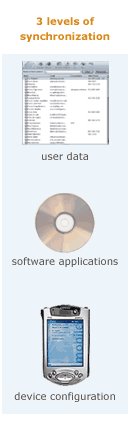
Mobile devices are the preferred user platform worldwide, so your next application will need to be optimized for mobile computing. Wireless devices are intermittently connected, yet must be capable of running your applications at any time. To do this, data must be cached on the device, and must be able to reliably synchronize with server-side data. But before that, your software application itself has to be kept up to date from the server…and before that, the underlying device has to be properly configured and managed to run your software.

To successfully build and deploy mobile applications, or extend your services to mobile users, you’ll need more than just Java or .Net. You’ll need the services provided by a mobile application server:

  • Data Synchronization
  • Application Provisioning
  • Device Management

Data synchronization is at the heart of mobile computing.
Whether it’s a new contact list, calendar entries, emails, today’s delivery schedule, or the current inventory report, mobile users need to have the right information to do their job, even though the devices are only intermittently connected. Your application will need to work with a wide variety of devices across all carriers and networks. More about synchronization…

Application provisioning is key to the mobile software life-cycle.
In mobile environments, the life cycle of a specific application version may be measured in minutes. With the limited memory of many mobile devices, application modules may have to be downloaded on a “single use” basis. Keeping all of your client devices up to date with the right modules is something you want done as a middleware service…not coded into your application. Funambol can help you here.

Remote device management and configuration is the “bootstrap.”
You rarely have control over the devices that will be trying to use your application or service. Yet devices have a wide range of configuration options. So it is important to be able to interrogate and monitor the device, and make configuration changes remotely. The only way to ensure ease of use and proper functionality is to have the device under some level of centralized control and management. More about device management…

Mobile Application Servers provide the key services and APIs.
Since your application will be running on both the client and server, you’ll need APIs, adaptors, and SDKs to make the application run seamlessly. You need more than just a proprietary “sync server.” You’ll also need more than a conventional application server, which does not have the synchronization services and protocol support you will need. Only a mobile application server explicitly designed from the ground up for wireless computing will do the job.

Open Source is the key technology base.
As has been proven with Linux, Apache, MySQL, JBoss, and other infrastructure technologies, open source is a cornerstone to rapid adoption and customer acceptance. Funambol’s core engine is open source technology that is being downloaded nearly 20,000 times a month. This means the high quality, broad device compatibility, and innovation rates made possible by large communities.


Computerworld | IP Telephony

Computerworld | IP Telephony

E-Mail Icon Generator

E-Mail Icon Generator

Uploading Old Email to Gmail using Java

Uploading Old Email to Gmail using Java

Wednesday, October 26, 2005

Friday, October 21, 2005

Gmail's Keyboard Shortcuts

Gmail Power Tips
http://www.extremetech.com/article2/0,1697,1865176,00.asp
discuss Discuss this now (5 posts)

A Table of Gmail Shortcuts

The keyboard shortcuts are many and various, and are all good to know about. But they're also very simple. By now you should have the hang of their power. Here then, before moving on, in Table 3-1 is a complete run-down of the keyboard shortcuts available at the time of writing.

Table 3-1 Gmail's Keyboard Shortcuts

KeyDefinitionAction
cComposeAllows you to compose a new message. Shift+c allows you to compose a message in a new window.
/SearchPuts your cursor in the search box.
kMove to newer conversationOpens or moves your cursor to a more recent conversation. You can hit Enter to expand a conversation.
jMove to older conversationOpens or moves your cursor to the next oldest conversation. You can hit Enter to expand a conversation.
nNext messageMoves your cursor to the next message. You can hit Enter to expand or collapse a message. (Only applicable in Conversation View.)
pPrevious messageMoves your cursor to the previous message. You can hit Enter to expand or collapse a message. (Only applicable in Conversation View.)
EnterOpenOpens your conversation. Also expands or collapses a message if you are in Conversation View.
uReturn to conversation listRefreshes your page and returns you to the Inbox, or list of conversations.
yArchive (Remove from current view)Automatically removes the message or conversation from your current view.

From Inbox, y means Archive

From Starred, y means Unstar

From Spam, y means Unmark as spam and move to Inbox

From Trash, y means move to Inbox

From any label, y means Remove the label

Pressing y has no effect if you're in Sent or All Mail.

xSelect conversationAutomatically checks and selects a conversation so you can archive, apply a label, or choose an action from the drop-down menu to apply to that conversation.
sStar a message or conversationAdds a star to or removes a star from a message or conversation. Stars allow you to give a message or conversation a special status.
!Report spamMarks a message as spam and removes it from your conversation list.
rReplyReply to the message sender. Shift+r allows you to reply to a message in a new window. (Only applicable in Conversation View.)
aReply allReply to all message recipients. Shift+a allows you to reply to all message recipients in a new window. (Only applicable in Conversation View.)
fForwardForward a message. Shift+f allows you to forward a message in a new window. (Only applicable in Conversation View.)
escEscape from input fieldRemoves the cursor from your current input field.

Combo-Key Shortcuts

Now that you're familiar with Gmail's keyboard shortcuts, Table 3-2 outlines the combo-key shortcuts:

Table 3-2 Combo-Keys Shortcuts

Shortcut KeyDefinitionAction
Tab then EnterSend messageAfter composing your message, use this combination to automatically send it. (Only supported in Internet Explorer)
y then oArchive and nextArchive your conversation and move to the next one.
g then aGo to All MailTakes you to All Mail, the storage place for all the mail you've ever sent or received, but haven't deleted.
g then sGo to StarredTakes you to all of the conversations that you've starred.
g then cGo to ContactsTakes you to your Contacts list.
g then dGo to DraftsTakes you to all the drafts that you've saved.
g then iGo to InboxTakes you back to the Inbox.

Moving on from the keyboard shortcuts, the next section shows you how you can avoid them altogether by using filters.
Plus Addressing and Filtering

One little known feature of the more old-school email systems is the one called plus addressing. It can be exceptionally useful both in Gmail and in your other email systems, and I use it extensively for things like mailing lists and weblog commenting.

In a nutshell, Gmail will ignore anything in the first half of an email address after a plus sign. So ben.hammersley+chapter_three_comments@gmail.com is treated in exactly the same way as ben.hammersley@gmail.com. It is not, as you might expect, a different address. You can put anything after the plus sign except for a space or an at (@) sign, and it will always get delivered to your real Inbox. Figure 3-5 should prove that it works.

Figure 3-5

Plus Addressing in action
click on image for full view

Plus Addressing is remarkably useful, as it enables you to set up filters for your incoming mail. In order to set up filters, click the "Create a filter" link to the right of the search bar. You will be presented with a screen containing something very much like Figure 3-6.

Figure 3-6

The first stage in setting up a filter
click on image for full view

Copy, as shown, the address into the To: box, and click on the Next Step button. Of course, this is how you create filters for any other part of the message, too. I'll leave it to the reader's intelligence to see how this works. Figure 3-7 shows the next stage.

Figure 3-7

Selecting the action you want Gmail to take when a message arrives
click on image for full view

A filter can move, star, directly archive, label, forward, and trash any message that triggers it. Select the actions you want, and click on the Create Filter button. Figure 3-8 shows the final result.

Figure 3-8

A filter, set up
click on image for full view

Because Plus Addressing effectively gives you an unlimited number of email addresses to the same Gmail inbox, it allows you to assign one to each mailing list, website, and so on that you subscribe to. You can also use it to track which email addresses have been sold to spammers, and send those to Trash automatically.

Advanced Searching

Gmail is run by Google, so it's obvious that its built-in search engine is going to be extremely powerful. Everyone is used to the ordinary search technique of putting keywords into the box and pressing enter, but not everyone is aware of the additional operators you can use. Table 3-3 gives a rundown:

Table 3-3: Gmail's Search Operators

Operator Definition Example(s)
from: Used to specify the sender Example: from:amy

Meaning: Messages from Amy.
to: Used to specify a recipient Example: to:david

Meaning: All messages that were sent to David (by you or someone else).

subject: Search for words in the subject line Example: subject:dinner

Meaning: Messages that have the word dinner in the subject.

OR Search for messages matching term A or term B

OR must be in all caps

Example: from:amy OR from:david

Meaning: Messages from Amy or from David.

-

(hyphen)

Used to exclude messages from your search Example: dinner-movie

Meaning: Messages that contain the word dinner but do not contain the word movie.

label: Search for messages by label

There isn't a search operator for unlabeled messages

Example: from:amy label:friends

Meaning: Messages from Amy that have the label friends.

Example: from:david label:my-family

Meaning: Messages from David that have the label My Family.

has:attachment Search for messages with an attachment Example: from:david has:attachment

Meaning: Messages from David that have an attachment.

filename: Search for an attachment by name or type Example: filename:physicshomework.txt

Meaning: Messages with an attachment named physicshomework.txt.

Example: label:work filename:pdf

Meaning: Messages labeled work that also have a PDF file as an attachment.

" "(quotes) Used to search for an exact phrase

Capitalization isn't taken into consideration

Example: "i'm feeling lucky"

Meaning: Messages containing the phrase i'm feeling lucky or I'm feeling lucky.

Example: subject:"dinner and a movie"

Meaning: Messages containing the phrase "dinner and a movie" in the subject.

( ) Used to group words

Used to specify terms that shouldn't be excluded.

Example: from:amy(dinner OR movie)

Meaning: Messages from Amy that contain either the word dinner or the word movie.

Example: subject:(dinner movie)

Meaning: Messages in which the subject contains both the word dinner and the word movie.

in:anywhere Search for messages anywhere in your account

Messages in Spam and Trash are excluded from searches by default.

Example: in:anywhere subject:movie

Meaning: Messages in All Mail, Spam, and Trash that contain the word movie.

in:inbox

in:trash

in:spam

Search for messages in Inbox, Trash, or Spam Example: in:trash from:amy

Meaning: Messages from Amy that are in the trash.

is:starred

is:unread

is:read

Search for messages that are starred, unread, or read Example: is:read is:starred from:David

Meaning: Message from David that have been read and are marked with a star.

cc:

bcc:

Used to specify recipients in the cc: or bcc: fields

Search on bcc: cannot retrieve messages on which you were blind carbon copied

Example: cc:david

Meaning: Messages that were cc-ed to David.

after:

before:

Search for messages after or before a certain date

Date must be in yyyy/mm/dd format.

Example: after:2004/04/17 before:2004/04/18

Meaning: Messages sent on April 17, 2004.

More precisely: Messages sent on or after April 17, 2004, but before April 18, 2004.

The operators detailed in Table 3-3 are all self explanatory, and can be combined. For example, consider the following search parameters:

in:inbox from:BenHammersley "fancy a pint?"

This search would result in any message from my Gmail account, in your Inbox, suggesting a visit to the pub. In order to bring any unread mail sent before New Year's Eve 2004, with an attachment, and the subject line New Year's Eve Invitation, you would conduct the following search:

is:unread before:2004/12/31has:attachment subject:"New Years Eve Invitation"

Very simple indeed.

Using Gmail to...

Using Gmail to...

Friday, August 26, 2005

Google: An Apology - ZDNet UK Comment

Google: An Apology - ZDNet UK Comment

Que mal

Nota Original
Published: July 14, 2005, 4:00 AM PDT
By Elinor Mills
Staff Writer, CNET News.com

Google CEO Eric Schmidt doesn't reveal much about himself on his home page.

But spending 30 minutes on the Google search engine lets one discover that Schmidt, 50, was worth an estimated $1.5 billion last year. Earlier this year, he pulled in almost $90 million from sales of Google stock and made at least another $50 million selling shares in the past two months as the stock leaped to more than $300 a share.

He and his wife Wendy live in the affluent town of Atherton, Calif., where, at a $10,000-a-plate political fund-raiser five years ago, presidential candidate Al Gore and his wife Tipper danced as Elton John belted out "Bennie and the Jets."

Schmidt has also roamed the desert at the Burning Man art festival in Nevada, and is an avid amateur pilot.

That such detailed personal information is so readily available on public Web sites makes most people uncomfortable. But it's nothing compared with the information Google collects and doesn't make public.

What Google knows about you

• Gmail -- The e-mail service offers two gigabytes of free storage and scans the content of messages to serve up context-related ads.

• Cookies -- Google uses cookies, which are commonly used to link individual users with activities.

• Desktop Search -- Google's Desktop Search lets users easily search files stored on their computer.

• Web Accelerator -- The application speeds Web surfing by storing cached copies of Web pages you've visited; those page requests can include personal information.

Assuming Schmidt uses his company's services, someone with access to Google's databases could find out what he writes in his e-mails and to whom he sends them, where he shops online or even what restaurants he's located via online maps. Like so many other Google users, his virtual life has been meticulously recorded.

The fear, of course, is that hackers, zealous government investigators, or even a Google insider who falls short of the company's ethics standards could abuse that information. Google, some worry, is amassing a tempting record of personal information, and the onus is on the Mountain View, Calif., company to keep that information under wraps.

Privacy advocates say information collected at Yahoo, Microsoft's MSN, Amazon.com's A-9 and other search and e-commerce companies poses similar risks. Indeed, many of those companies' business plans tend to mimic what Google is trying to do, and some are less careful with the data they collect. But Google, which has more than a 50 percent share of the U.S. search engine market, according to the latest data from WebSideStory, has become a lightning rod for privacy concerns because of its high profile and its unmatched impact on the Internet community.

"Google is poised to trump Microsoft in its potential to invade privacy, and it's very hard for many consumers to get it because the Google brand name has so much trust," said Chris Hoofnagle of the Electronic Privacy Information Center. "But if you step back and look at the suite of products and how they are used, you realize Google can have a lot of personal information about individuals' Internet habits--e-mail, saving search history, images, personal information from (social network site) Orkut--it represents a significant threat to privacy."

Kevin Bankston, staff attorney at the Electronic Frontier Foundation, said Google is amassing data that could create some of the most detailed individual profiles ever devised.

"Your search history shows your associations, beliefs, perhaps your medical problems. The things you Google for define you," Bankston said.

The Google record
As is typical for search engines, Google retains log files that record search terms used, Web sites visited and the Internet Protocol address and browser type of the computer for every single search conducted through its Web site.

In addition, search engines are collecting personally identifiable information in order to offer certain services. For instance, Gmail asks for name and e-mail address. By comparison, Yahoo's registration also asks for address, phone number, birth date, gender and occupation and may ask for home address and Social Security number for financial services.

"It's data that's practically a printout of what's going on in your brain: What you are thinking of buying, who you talk to, what you talk about."
--Kevin Bankston, staff attorney, Electronic Frontier Foundation

If search history, e-mail and registration information were combined, a company could see intimate details about a person's health, sex life, religion, financial status and buying preferences.

It's "data that's practically a printout of what's going on in your brain: What you are thinking of buying, who you talk to, what you talk about," Bankston said. "It is an unprecedented amount of personal information, and these third parties (such as Google) have carte blanche control over that information."

Google uses the log information to analyze traffic in order to prevent people from rigging search results, for blocking denial-of-service attacks and to improve search services, said Nicole Wong, associate general counsel at Google.

Personally identifiable information that is required for consumers to register for and log in to Google services is not shared with any outside companies or used for marketing, according to Google's privacy policy, except with the consent of the user, or if outside "trusted" parties

Correction: The original article incorrectly implied that Google Desktop Search can track what's stored on a user's PC. The service does not expose a user's content to Google or anyone else without the user's explicit permission.

Continued ...
Click on a comment to explore replies (19 total replies - 0 NEW )

Somebody's Watching Me Marc Leblanc -- Jul 14
Is Google Evil? Broward Horne -- Aug 8
Better explained by Isaac Asimov Hugoh Barbosab -- Aug 11


Thursday, August 25, 2005

No esta tan mal la Yi?

I LAST VISITED ON 08/25/2005
PHOTO OPTIONS: 1st 2nd

Add Yi to your
EMAIL FRIENDS LIST
Member ID: CBP336878

Send an Auto Email

I'm: Single
Age: 26
Birthday: 11/05/1978
Height: 5' 3"
Weight: 110 - 114
Hair: Black
Eyes: Brown
Religion: Agnostic
City: Shenyang
Country: China
Race: Asian
Nationality: Chinese
Edu: Masters
Emp: Education
Children: 0
Drink: Occasionally
Smoke: Not At All
On Site Since: 08/23/2005
Profile Updated: 08/25/2005
Write an Email
Profile Updated: 08/25/